Here I go making things, breaking things, forgetting things, fixing things… kinda my standard MO.
Years ago I made a lil baby kitten python embed WP plugin :heart_eyes:
Then that and this website both became deprioritized, partially finished projects of mine, rotting in the graveyard with my many other unfinished projects. I abandoned my baby. I’m not proud. But I have returned now to make things right.
The irony is that I put this off for years even though it only took me like 30 seconds to fix. ADHD much?
So anyway. At some point the python version install on my DreamPress stopped being under the file path I have specified in my plugin code, and that point was probably when DreamHost did a server update. I did not have to look it up to know that this error means my plugin can not find my Python install:
sh: /home/user/kittenkamala.com/wp-content/plugins/KittenPE/hello.py: /usr/bin/python: bad interpreter: No such file or directoryI made my KittenPE plugin when Python 3.7 was the latest version.
I realize this is confusing but at the time of writing this (July 2026) 3.7 was EOL’d long ago and the most current stable version is 3.14. With 3.15 in pre-release at the time of writing this, and 3.16 pending. Don’t ask me about their version numbering because I don’t know. But the chances of me researching and finding out and coming back here to explain it extensively are equally as high as the chances of me completely forgetting about it for another 5 years.
Edit: oh, I researched it. I researched it real good. Here’s what you probably don’t need to know, but I am going to tell you anyway:
- Python does not follow typical semantic versioning standards, nor does it follow standard calendar versioning. Instead, they have their own version specifiers. This versioning weirdness started way back when they launched the Python 3000 project that became Python 3. For more historical context check out PEP 440 and PEP 459.
- By their own standards, Python version numbering is incrementally increased. Their schema is
major.minor.patch, which should be easy to understand. So wth, why isn’t it?- The tl;dr is that the minor version number went from single to double digits. Usually when or before a software makes it to version
x.9, a new major version is released with a new incrementally increased number before the decimal point, . i.e. WordPress6.9came out, 6 being the major version and 9 being the minor version, and then WordPress7.0is the next version WP Core released. Software versions typically have only one number after the decimal point (x.xand notx.xx). - Our brains are trained to automatically read numbers like 3.7 or 3.14 as a fractional number. For the average person who learned regular decimal and fractional math, a jump from
3.7to3.1Xis an incremental decrease. In standard math, the first point after the decimal is a tenth, the second is a hundreth and so forth.3.7would be3 wholes and 7/10ths, which also can be represented as3.70or3 wholes and 70/100ths, while3.14would be3 wholes and 14/100ths. So .7 = 7/10ths, equivalent to 70 out of 100 while .14 = 14/100ths, equivalent to 14 out of 100. 14 is less than 70, that’s a decrease. Right? - Wrong. For the sake of understanding Pythons versioning logic, we have to unlearn all of that. While the format has the appearance of a float or decimal, it’s neither. The minor number is not fractional by 100ths in this case, it’s just simply not fractional at all. They are whole numbers. If we were versioning based on regular math, their Python 3 versioning would be best represented as
3.07and3.14. That makes mathematical sense and is less confusing. But they aren’t doing that, in this case we have to look at the minor version as an isolated count having nothing to do with how decimals work:3.7is the 7th minor version, while3.14is the 14th, and 14 is obviously a higher number than 7. - It’s significantly more simple than math: the decimal point here is acting as a delimiter, connecting separate elements of a name, and does not indicate a continuation of the value of the first number. The number before the point and the number after the point are completely separate values. Its major version 3, minor version 7 or minor version 14. Not version 3.7 or 3.14. It is confusing until you stop looking at the number as a decimal.
- The tl;dr is that the minor version number went from single to double digits. Usually when or before a software makes it to version
- It’s important to know that there is no Python 4 on the roadmap, as stated by Python creator Guido van Rossum in this interview. With no new major version on the roadmap, Python is just counting up minor numbers and the major number remains 3. So first came 7 and now it’s up to 14. Their versioning plan is to keep going all the way up to Python 3.99. And then what? Not sure, there’s a long way to go. It’s worth acknowledging that forgoing backwards compatibility for Python 2 in Python 3 was a nightmare for their dev team and users, and that seems to be at least part of why there isn’t a Python 4 on the map.
So, I went ahead and installed python 3.14 on my DreamPress. According to DreamHost knowledge base you can only install a custom version on shared, VPS or a Dedicated server, but the custom install VPS approach works on DreamPress too. For me at least. I had zero issue with these steps on my DreamPress:
SSH into your web server and navigate to your user’s home directory
user@computer$ cd ~Make a tmp directory to download your python tar to
user@computer$ mkdir tmpNavigate into that tmp directory
user@computer$ cd tmpFetch the tar from the Python motherland
user@computer$ wget https://www.python.org/ftp/python/3.14.0/Python-3.14.0.tgzUnpack that like it’s Pandora’s box
user@computer$ tar zxvf Python-3.14.0.tgzMake your way into your shiny new Python-3.14.0 directory
user@computer$ cd Python-3.14.0Tell your linux box where to find the new Python version to use as default
user@computer$ ./configure –prefix=$HOME/opt/python-3.14.0Compile and install the Python package using a make command. It will vomit some matrix stuff on you
user@computer$ make
user@computer$ make installNavigate back into the depths of your web server’s soul
user@computer$ cd ~Now edit your bash file to add the file path for your custom install to your user
user@computer$ nano . ~/.bash_profileOr
user@computer$ vim . ~/.bash_profilePaste this into your bash_profile file and save:
export PATH=$HOME/opt/python-3.14.0/bin:$PATHThat is declaring a variable called PATH and assigning the file path to it as the value.
And .. voila!
Verify you deed eet:
user@computer$ python3 –versionIt should spit this out:
Python 3.14.0Hooray! Hoorah! Yahoo!
Buuuuuttt I probably didn’t actually need to do all that. I probably could have just updated the file path in my plugin file and let it use the default install of python 3.10.
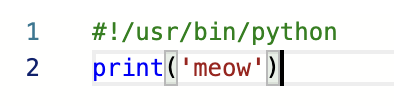
My hello.py file was using this path, which used to be correct:
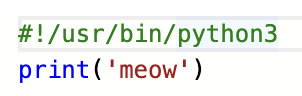
Now it needs to be this:
Seriously the easiest fix. And it only took me about half a second.
A few years and half a second 😛
p.s. Thank you to whichever friend of mine at DH quietly gave me back root on my VPS and DreamPress (???) (which I originally lost when I stopped working there). You are my hero!
Not sure if this worked for me because I have root, or if it would work for everyone. But no sudo commands were used in the making of this blog post, so likely the latter.
Do try this at home!